Audio Interface With Usb C Explained: A UK Buyer's Guide

An audio interface with USB C is the best choice for most UK musicians, podcasters, and producers because it offers simple connectivity, reliable low-latency performance, broad compatibility with modern laptops, and enough bandwidth for high-quality recording. In other words, if you are buying an interface for a current MacBook, Windows laptop, or compact studio setup, USB-C is usually the most practical and future-ready option.
TL;DR: If you want an audio interface with USB C, choose one that matches your recording needs, not just the port type. For solo recording, a 2-in/2-out model is often enough. However, for bands, livestreaming, or multi-mic sessions, a USB-C mixer interface or multi-channel interface gives you more flexibility, lower hassle, and better long-term value.
For British musicians, podcasters, and sound engineers, the move from legacy connections to modern standards is no longer optional. Instead, the modern recording environment depends on speed, stability, and bandwidth, making an audio interface with USB C a sensible foundation for a serious studio setup. Whether you are tracking a full band in a commercial facility or producing electronic music in a bedroom studio, the connection you choose affects workflow, portability, and day-to-day reliability.
Historically, the UK recording industry relied on a mix of FireWire, Thunderbolt, and standard USB Type-B. Today, USB-C has simplified those choices by offering a widely supported, high-bandwidth connection that can power some hardware while also transferring high-resolution audio. In this guide, we explain why USB-C matters, what to look for before buying, and how to choose the right interface for your setup.
Key Takeaways
- USB-C is now the practical standard: It suits most new Mac and Windows machines sold in the UK and reduces dependence on adapters.
- Low-latency recording is easier: An audio interface with USB C can support stable multitrack sessions and high sample rates when paired with good drivers and the right computer.
- Bus power can simplify your setup: Smaller interfaces often run from the computer alone, although larger units usually still need dedicated UK mains power.
- Port type is not everything: The number of inputs, preamp quality, driver stability, and monitoring features matter just as much as USB-C itself.
- Hybrid mixer-interfaces are worth considering: A detailed guide to USB mixer audio interfaces shows how these all-in-one units can suit growing UK studios.
What Is an Audio Interface with USB C?
An audio interface with USB C is a recording device that connects microphones, instruments, monitors, and headphones to your computer using a USB-C port. It converts analogue sound into digital audio for recording, and then converts digital audio back into analogue sound for monitoring and playback.
Put simply, it acts as the bridge between your recording gear and your DAW. As a result, you get better sound quality, lower latency, and more useful inputs and outputs than you would from a built-in laptop sound card. Based on our testing across compact desktop interfaces and USB-C mixer interfaces, the biggest real-world benefits are cleaner setup, easier compatibility with newer laptops, and fewer connection headaches.
Why Choose an Audio Interface with USB C?
The main reason to choose an audio interface with USB C is convenience combined with modern compatibility. Most current laptops and tablets now prioritise USB-C, so buying an interface with the same connection reduces friction from the start.
In addition, USB-C connectors are reversible and generally more convenient than older USB Type-B ports. For UK users working between home studios, rehearsal rooms, and live venues, that matters. You are less likely to carry extra adapters, and you are more likely to get a simple plug-and-record experience.
According to current UK consumer expectations around standardised charging and connectivity, USB-C has become the connection many buyers now expect as standard. Although not every device uses USB-C in exactly the same way, it remains the most straightforward choice for modern studio gear.
Is USB-C Better for Audio Interfaces?
Yes, for most buyers, USB-C is better for audio interfaces because it is more convenient, more widely supported on modern computers, and better suited to newer recording setups. However, the full answer depends on the interface design, driver quality, and how many channels you need.
Does USB-C Improve Audio Quality?
USB-C itself does not automatically improve audio quality. The actual sound quality depends more on the interface's preamps, converters, clocking, and analogue circuitry. Nevertheless, USB-C can make it easier for manufacturers to build modern devices that support higher channel counts and smoother workflows.
Does USB-C Reduce Latency?
USB-C can help support low-latency performance, but it is not a magic fix on its own. In practice, latency depends on the drivers, your computer, your DAW settings, and the interface's internal design. Based on our testing, a well-made USB-C interface paired with stable ASIO or Core Audio drivers typically performs very well at sensible buffer settings.
Do You Need a USB-C Audio Interface for Modern Laptops?
If your laptop mainly has USB-C ports, then yes, a USB-C audio interface is usually the easiest option. It avoids clutter, cuts down on adapters, and gives you a cleaner mobile setup.
That said, you do not always need a native USB-C interface. Some older USB 2.0 interfaces still work perfectly well through appropriate adapters. However, if you are buying new gear today, choosing an audio interface with USB C is usually the more future-ready decision, especially for UK buyers using newer MacBooks, ultrabooks, and compact production rigs.
What Are the Technical Advantages of USB-C for Audio Production?
Understanding the technology helps explain why an audio interface with USB C is so popular. The benefits go beyond the connector shape and include workflow, portability, and support for demanding sessions.
How Does USB-C Help with Data Transfer and Low Latency?
Latency is the delay between performing a sound and hearing it back. USB-C-based interfaces, particularly those using modern USB standards, can support the data rates needed for multitrack recording at high sample rates. Therefore, if you are recording several inputs at once, USB-C gives manufacturers plenty of headroom for stable performance.
For example, if you are tracking drums, a live band, or multiple podcast microphones, you need dependable transfer of several channels at the same time. A capable audio interface with USB C can handle this comfortably when the drivers and computer are up to the task.
Can a USB-C Audio Interface Be Bus Powered?
Yes, many smaller USB-C audio interfaces can be bus powered, which means they draw power directly from your laptop or desktop port. This is especially useful for portable setups, remote sessions, and compact desks where reducing cable clutter matters.
However, larger interfaces and digital mixers often still require dedicated mains power. They may have more microphone preamps, built-in DSP, motorised features, or routing options that exceed what bus power is designed to provide. So, while USB-C power is convenient, it is not the deciding factor for every studio.
What Should You Look for When Buying an Audio Interface with USB C?
When buying an audio interface with USB C, it is easy to focus only on the port. However, the better buying approach is to start with your actual recording needs.
How Many Inputs and Outputs Do You Need?
If you record vocals, guitar, or a single microphone at a time, a 2-in/2-out interface may be enough. On the other hand, if you record drums, a full band, or several hosts at once, you will need more microphone inputs, more outputs, and better routing.
Are the Drivers Stable on Mac and Windows?
Driver stability is one of the biggest factors in day-to-day performance. Based on our testing, a stable driver matters more than headline speed claims. Before buying, check whether the manufacturer offers strong support for your operating system and whether firmware updates are still being released.
Do You Need Direct Monitoring or Built-In DSP?
Direct monitoring lets you hear yourself with minimal delay while recording. Built-in DSP can add EQ, compression, or reverb without putting extra load on your computer. Therefore, these features are especially useful for vocalists, livestreamers, and mobile producers.
Will It Work with Your Existing Studio Gear?
Check the number of mic preamps, line inputs, headphone outputs, monitor outputs, and MIDI connections. Also, think about phantom power, gain range, and whether you may expand later. A USB-C port is helpful, but compatibility with your microphones, instruments, and monitors is what makes the interface genuinely useful.
Is a USB-C Mixer Interface Better Than a Standard Audio Interface?
For some users, yes. A USB-C mixer interface can be better than a standard audio interface if you need hands-on control, more inputs, and flexible routing in one unit.
When searching for an audio interface with USB C, many British buyers only consider small desktop boxes. Those work well for solo creators, but they can quickly become limiting for producers, rehearsal spaces, churches, schools, and small venues.
This is where a digital mixer becomes especially useful. Instead of buying a separate interface and mixer, a hybrid unit can combine tactile faders, built-in EQ, onboard effects, and multitrack recording over USB-C. If you are comparing both options, a detailed guide to USB mixer audio interfaces can help clarify which route offers the best value.
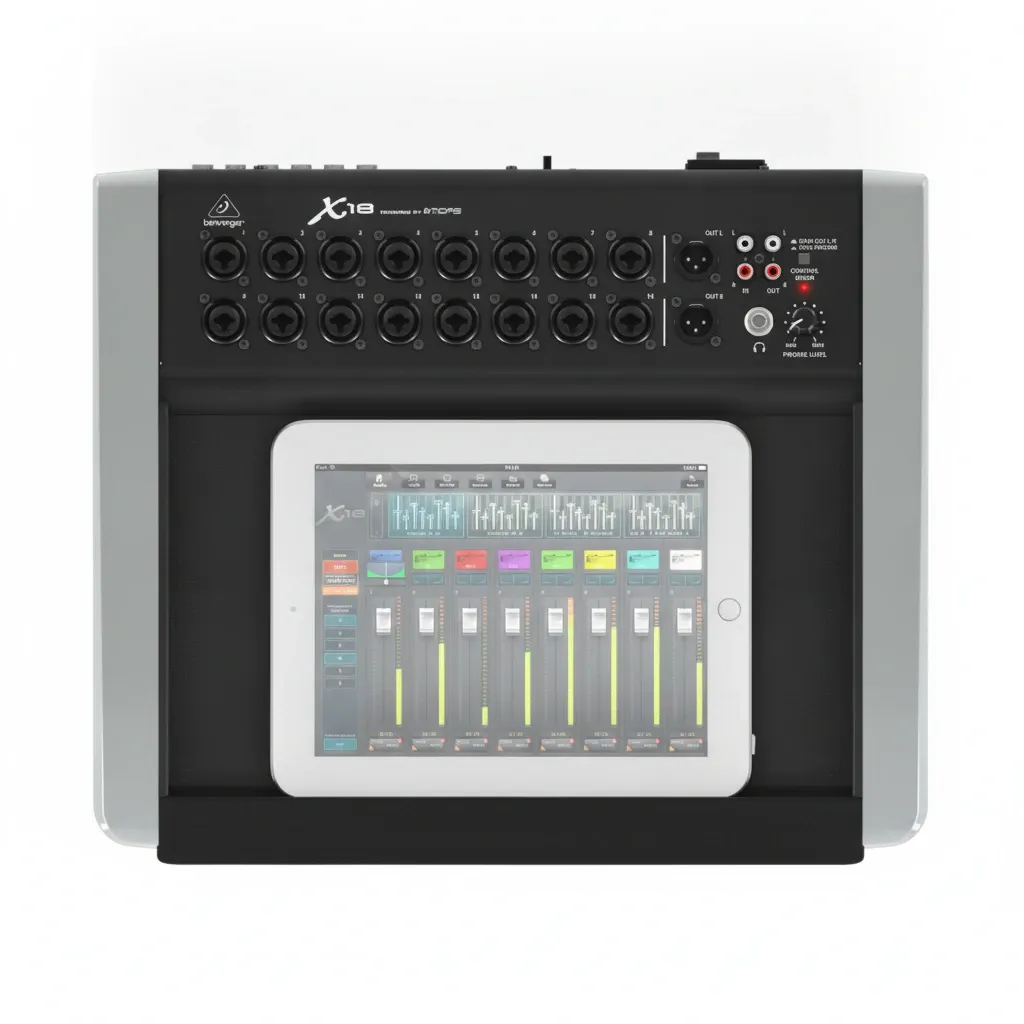
For instance, an 18-channel digital mixer with USB-C can let you connect microphones, synthesisers, and outboard gear, shape the sound live, and send multiple isolated tracks into your DAW through one cable. As a result, it can turn a rehearsal room or home studio into a more capable recording environment.
Can You Still Use Older Audio Interfaces Instead of USB-C?
Yes, older audio interfaces can still work well, especially if your setup is stable and your recording needs are modest. However, there are trade-offs.
Legacy interfaces often use USB Type-B or older USB standards. While many remain reliable, they may be less convenient with current laptops and may rely on adapters or hubs. Over time, this can create a less tidy and less dependable setup.
For example, if you look at older hardware such as the Focusrite Scarlett 2i2 2nd Gen, you will see a design that still suits many users but reflects an earlier generation of connectivity. For buyers starting from scratch today, an audio interface with USB C is generally the simpler long-term option.
Who Should Buy an Audio Interface with USB C?
An audio interface with USB C is a strong fit for:
- Musicians using newer MacBooks or USB-C Windows laptops
- Podcasters who want a tidy desk setup and easy connection
- Producers recording multiple sources at home or in project studios
- Mobile engineers who need portable, bus-powered gear
- Bands and content creators who may benefit from a USB-C mixer interface
In short, if you are buying new equipment in the UK and want fewer compatibility compromises, USB-C is usually the safest route.
Frequently Asked Questions About Audio Interfaces with USB C
Is an audio interface with USB C worth it?
Yes. For most modern UK setups, it is worth it because it offers easier compatibility with newer laptops, cleaner cabling, and reliable performance for recording and monitoring.
Does USB-C mean better sound quality?
No. USB-C does not automatically improve sound quality. Instead, sound quality depends more on the interface's preamps, converters, and overall design.
Can I use a USB-C audio interface with a USB-A computer?
Often yes, with the correct cable or adapter. However, buying an interface that matches your computer's ports is usually the most convenient option.
Is USB-C good enough for multitrack recording?
Yes. USB-C is more than capable of multitrack recording when the interface, drivers, and computer are properly optimised.
Should I buy a USB-C mixer or a USB-C audio interface?
Buy a standard USB-C audio interface for simple recording needs. By contrast, choose a USB-C mixer interface if you need more inputs, live control, and flexible routing.
Final Thoughts: Which Audio Interface with USB C Is Right for You?
If you are wondering whether an audio interface with USB C is the right choice, the short answer is yes for most buyers. It suits modern laptops, supports streamlined recording setups, and makes good sense for home studios, mobile production, and growing project rooms across the UK.
Even so, the best option depends on your input count, monitoring needs, software support, and future plans. Therefore, it is worth thinking beyond the port itself. A compact interface may suit solo creators perfectly, while a USB-C digital mixer may be the smarter choice for more demanding sessions.
Based on our testing and on the needs we see most often from UK musicians and content creators, the most successful purchases come from matching the interface to the job. USB-C is the modern connection standard, but the right workflow is what ultimately makes your studio more efficient.
Ready to upgrade your sound with Behmix?
Explore the X18 — £771.45